This article goes over the steps to move the sales invoice between customers in Turbo Inventory.
Moving the Sales Invoice
- Click Sales
- Click Sales Invoices
- In the header bar select Move Sales Invoices
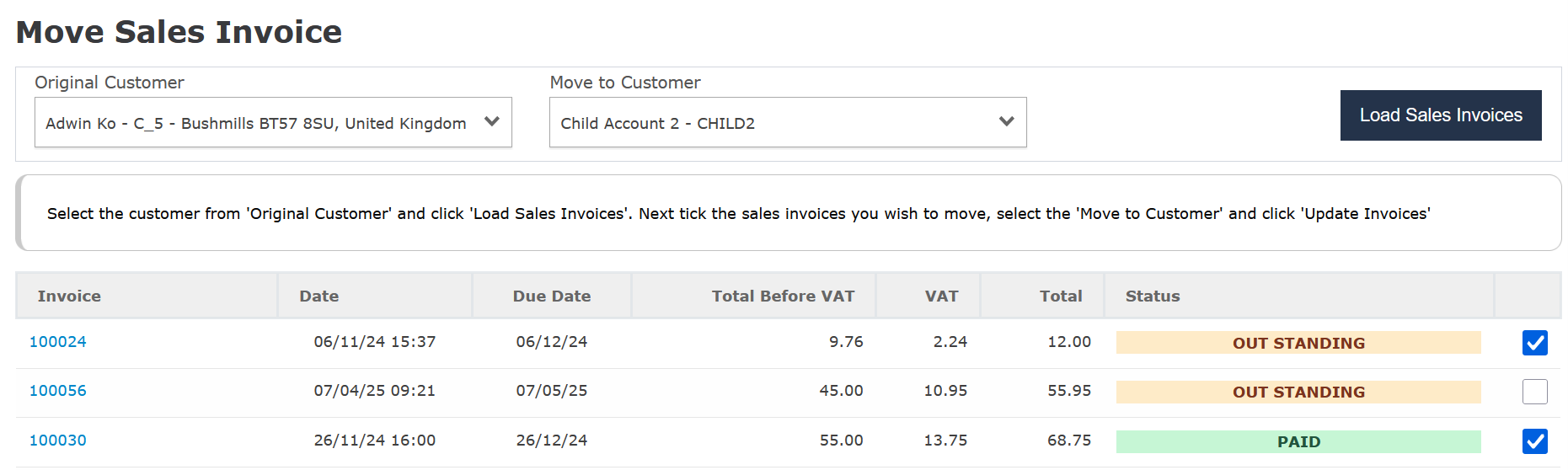
- Set the Original Customer as the customer who has the Sales Invoice
- Set the Move to Customer as the new customer
- Click Load Sales Invoices, this will load any movable sales invoices.
- Tick the invoices you want to move and click Update Invoices
For Cash Sales (Sales where no Customer Account has been selected);
- Click Sales
- Click Sales Invoices
- Click View and then Edit
- Select the Customer account in the top left
- Use the Charge to Account or Post buttons to save your changes
The Account cannot be changed on a Cash Sales invoice if it has been paid. You must delete the payment from the View screen before changing the invoices owner.
Was this article helpful?
That’s Great!
Thank you for your feedback
Sorry! We couldn't be helpful
Thank you for your feedback
Feedback sent
We appreciate your effort and will try to fix the article